Your whole classroom, in one calm place.
ClassHarbor is the all-in-one assistant for teachers: rosters and attendance, behavior tracking, weekly schedules, seating charts, class jobs, and parent communication — everything saved automatically and always in sync.
No credit card required · $4.99/month or $40.00/year after the trial

Everything a busy teacher needs
One subscription covers every classroom workflow — and your data stays private to you, for every class you teach.
Roster & Attendance
Import your roster from a CSV, keep parent contacts at hand, and take daily attendance in seconds — with absence reasons and notes.
Behavior Tracker
Track each student's week with a ready-to-learn chart, log classroom expectation recognitions, and apply bulk updates.
Weekly Schedule
Plan subject blocks and daily goals, add recurring duties, and copy a week forward in one tap.
Seating Chart
Drag-and-drop tables that match your real room, seat students with a tap, randomize picks, and print a clean layout.
Class Jobs
Rotate weekly classroom jobs, randomize assignments, and keep a history of who did what.
Class Expectations
Publish color-coded classroom rules and export them as a poster-ready PDF.
Parent Communication
Log every call and note home, send conference invites parents book themselves, sync straight to your Google Calendar, and draft report card comments.
Mindfulness Studio (add-on)
Guided breathing exercises and meditations for your class — or for you — with session tracking.
See ClassHarbor in action
Built with real classrooms in mind — every screen is designed to be picked up between the bell and the first lesson.

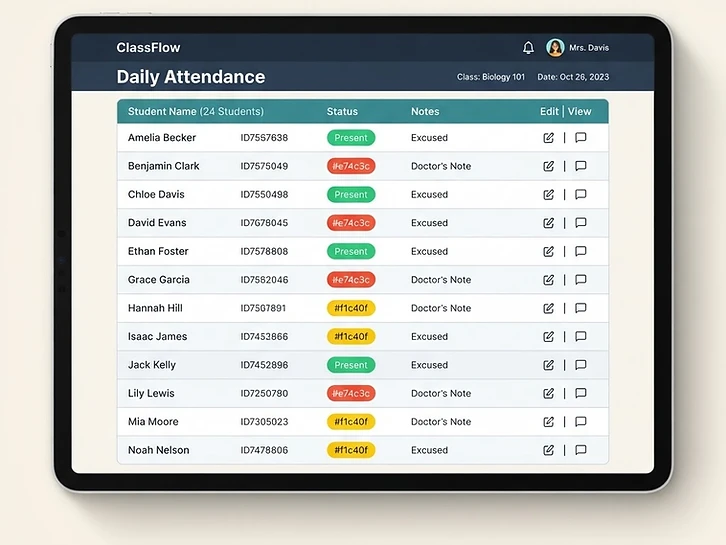
Roster & Attendance
Attendance in thirty seconds
Import your roster once, then mark the whole class present in one tap. Absences ask why — illness, appointment, family emergency — so your records are audit-ready without extra typing.


Seating Chart
A seating chart that matches your real room
Drag tables around, pick rectangle, circle, or horseshoe shapes, and seat students with a tap. Color-code groups, flag learning supports, and print a clean layout for substitutes.


Parent Communication
Conferences that book themselves
Email parents a link; they pick a slot that works for them. Every booking lands on your Google Calendar automatically, with a confirmation in your communication log.
Privacy & security
A safe harbor for your data
Student records, family contact details, and communication logs are confidential. ClassHarbor is built so they stay that way.
Private by default
Every roster, behavior note, and log lives in your account alone — no other user can view or edit your students' records.
Confidential family details
Parent names, emails, and phone numbers stay locked inside your account. They are never shared or sold.
Secured on every request
Traffic is encrypted in transit, and access to your records is enforced server-side on every single request.
You stay in control
Delete your account from Settings and every student record, note, and log is permanently removed.
Simple pricing
One teacher account · every feature
Monthly
$4.99/month
Yearly
$40.00/year
1-month free trial, no credit card required
Unlimited classes and rosters
Conference invites parents book themselves
Google Calendar sync for conferences
Print-ready seating charts and rule posters
Works on your phone, tablet, and desktop
Optional Mindfulness Studio add-on: $1.49/month or $10.00/year · secure checkout · cancel anytime

